# How to filter wallets by required features with TON Connect (https://docs-rbcpr9qys-ton-core-docs.vercel.app/llms/applications/ton-connect/how-to/filter-wallets/content.md)
`walletsRequiredFeatures` limits the wallet picker to wallets that advertise the capabilities your dApp depends on. The SDK compares each wallet's advertised features against the option and removes any wallet that does not match. For the protocol-level feature catalogue, see [`Feature` specification](https://github.com/ton-blockchain/ton-connect/blob/main/spec/connect.md#feature).
## Use with `TonConnectUI` [#use-with-tonconnectui]
```ts
import { TonConnectUI } from '@tonconnect/ui';
const tonConnectUi = new TonConnectUI({
manifestUrl: 'https://example.com/tonconnect-manifest.json',
walletsRequiredFeatures: {
sendTransaction: {
minMessages: 1,
itemTypes: ['gram', 'jetton']
},
signData: {
types: ['text', 'binary', 'cell']
},
signMessage: {
minMessages: 1
},
embeddedRequest: {}
}
});
```
## Use with `TonConnectUIProvider` (React) [#use-with-tonconnectuiprovider-react]
```tsx
import { TonConnectUIProvider } from '@tonconnect/ui-react';
function App() {
return (
{/* your app */}
);
}
```
## How matching works [#how-matching-works]
A wallet matches when it advertises every requirement listed. Top-level keys combine as a logical AND — declaring `sendTransaction` and `signMessage` requires both.
For each filter the SDK compares your declaration to the wallet's [`Feature`](https://github.com/ton-blockchain/ton-connect/blob/main/spec/connect.md#feature) entry:
* `minMessages` — the wallet's `maxMessages` must be greater than or equal to this value.
* `extraCurrencyRequired: true` — matches only wallets whose feature has `extraCurrencySupported: true`.
* `itemTypes` — every requested type must appear in the wallet's `itemTypes`.
* `signData.types` — every requested type must appear in the wallet's `types`.
* `embeddedRequest` — matches any wallet that exposes the `EmbeddedRequest` feature; the entry takes no parameters.
## How filtered wallets appear in the modal [#how-filtered-wallets-appear-in-the-modal]
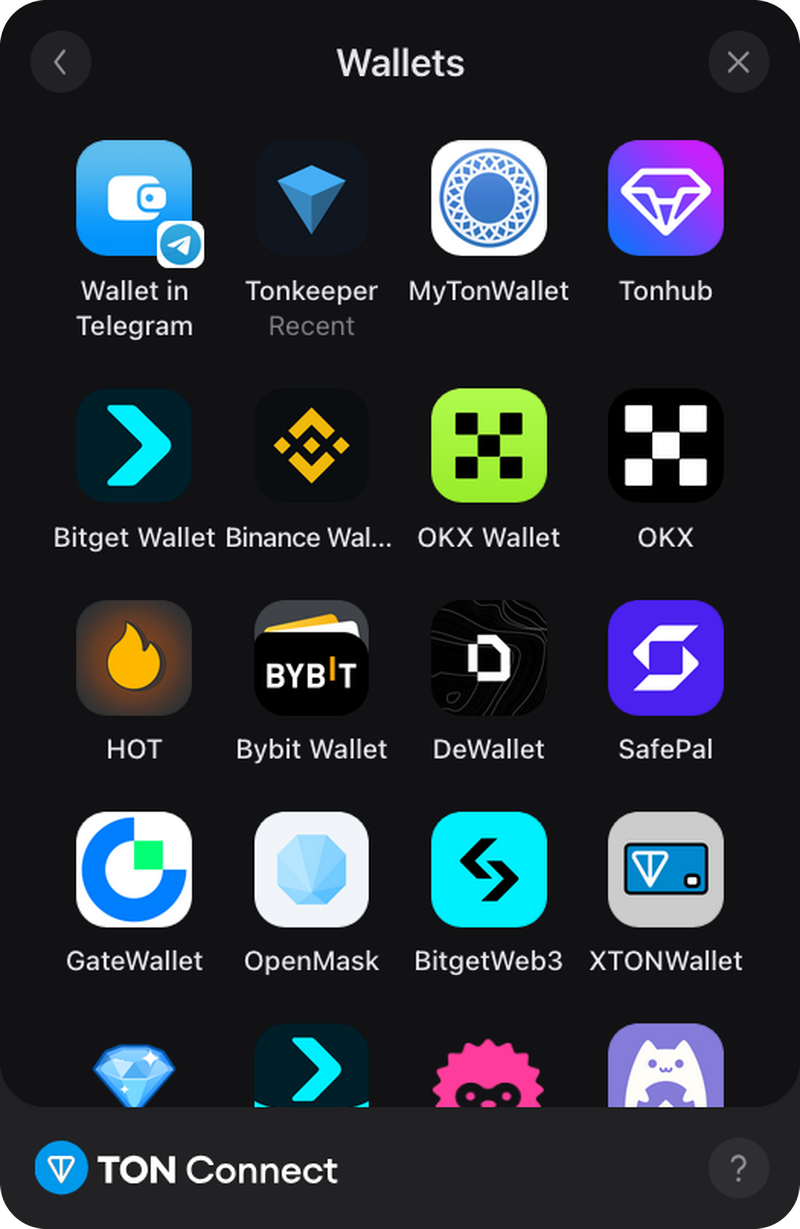
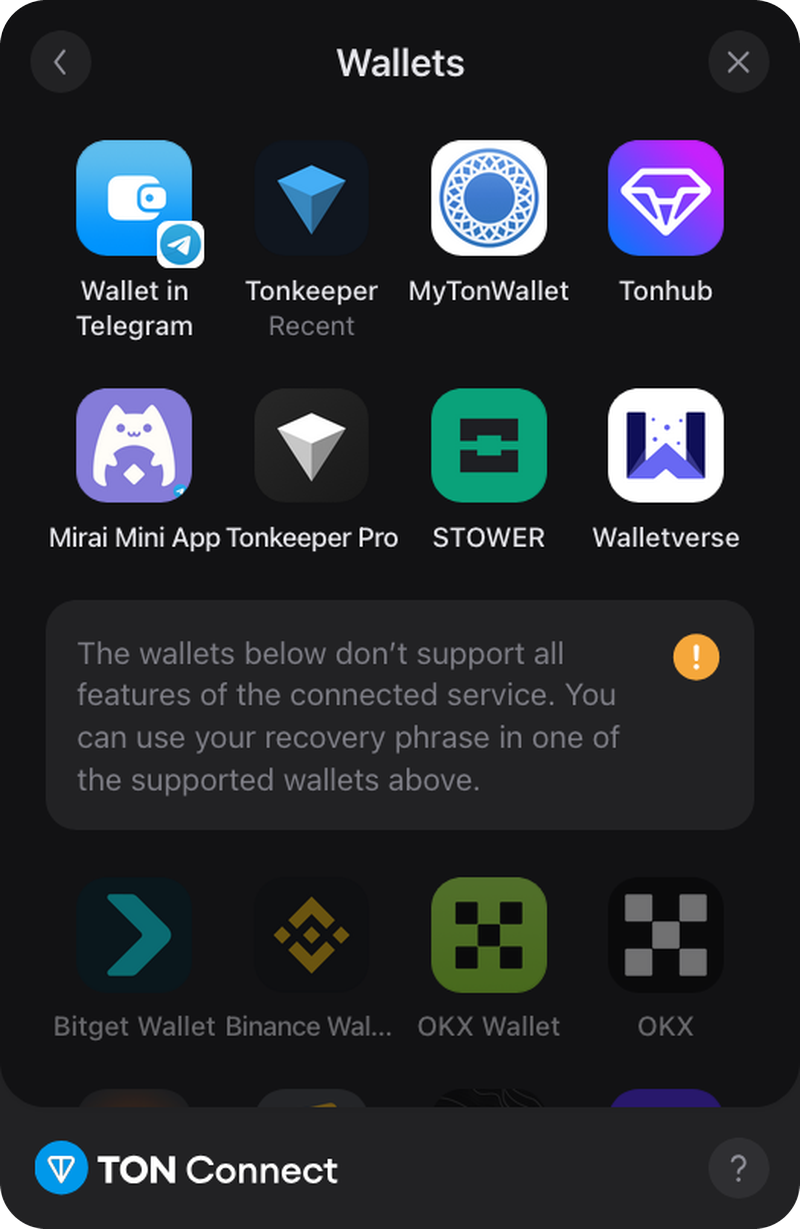
The main connect screen shows only matching wallets. The full "Wallets" list places matching wallets first and unsupported wallets below a separator. With `walletsRequiredFeatures` set, unsupported entries appear greyed out. Clicking one shows a brief error notification rather than starting the connection.
If a wallet's advertised features turn out to be insufficient at connect time, the SDK throws `WalletMissingRequiredFeaturesError` and the modal switches to an unsupported-wallet view.
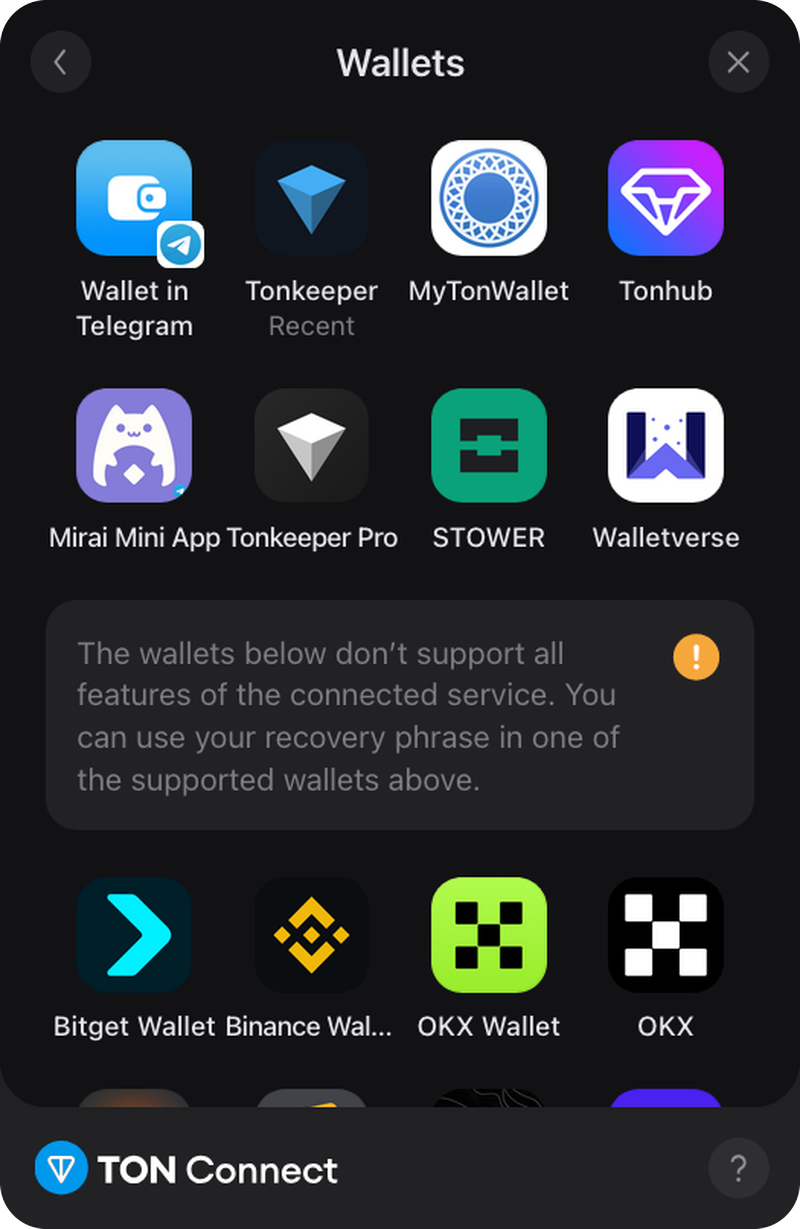
The "View all wallets" screen with no filter, with `walletsRequiredFeatures` and with `walletsPreferredFeatures`:
|  |
|  |
|  |
| :-----------------------------------------------------------------------------------------------------------------: | :--------------------------------------------------------------------------------------------------------------------------------------------------------------------------------: | :--------------------------------------------------------------------------------------------------------------------------------------------------------------------------------------------------------: |
| *No filter* | *`walletsRequiredFeatures`* | *`walletsPreferredFeatures`* |
## Available filters [#available-filters]
```ts
type RequiredFeatures = {
sendTransaction?: {
minMessages?: number; // wallet's maxMessages must be ≥ this
extraCurrencyRequired?: boolean; // wallet must set extraCurrencySupported
itemTypes?: ('gram' | 'jetton' | 'nft')[];
};
signData?: {
types: ('text' | 'binary' | 'cell')[]; // every requested type must be supported
};
signMessage?: {
minMessages?: number;
extraCurrencyRequired?: boolean;
itemTypes?: ('gram' | 'jetton' | 'nft')[];
};
embeddedRequest?: {}; // wallet must expose EmbeddedRequest
};
```
`signData.types` is required when `signData` is present; the other sub-fields are optional. The type is exported as `RequiredFeatures` from `@tonconnect/sdk` and re-exported by `@tonconnect/ui` and `@tonconnect/ui-react`.
> **Note.** A sibling option `walletsPreferredFeatures` accepts the same shape and applies a softer policy. The main connect screen still hides unsupported wallets, but in the full "Wallets" list they appear without the disabled style — clicking one attempts a normal connection. Unlike `walletsRequiredFeatures`, the SDK does not enforce the match at connect time, so the dApp is responsible for handling missing features itself.
## See also [#see-also]
* [Send a transaction](https://docs-rbcpr9qys-ton-core-docs.vercel.app/llms/applications/ton-connect/how-to/send-transaction/content.md) — uses `sendTransaction.itemTypes`
* [Sign data](https://docs-rbcpr9qys-ton-core-docs.vercel.app/llms/applications/ton-connect/how-to/sign-data/content.md) — uses `signData.types`
* [Sign and relay a message (gasless)](https://docs-rbcpr9qys-ton-core-docs.vercel.app/llms/applications/ton-connect/how-to/sign-message-gasless/content.md) — uses `signMessage`
* [Connect-and-act in one tap (embedded request)](https://docs-rbcpr9qys-ton-core-docs.vercel.app/llms/applications/ton-connect/how-to/embedded-request/content.md) — uses `embeddedRequest`
* [`Feature` in the Connect specification](https://github.com/ton-blockchain/ton-connect/blob/main/spec/connect.md#feature)
|
| :-----------------------------------------------------------------------------------------------------------------: | :--------------------------------------------------------------------------------------------------------------------------------------------------------------------------------: | :--------------------------------------------------------------------------------------------------------------------------------------------------------------------------------------------------------: |
| *No filter* | *`walletsRequiredFeatures`* | *`walletsPreferredFeatures`* |
## Available filters [#available-filters]
```ts
type RequiredFeatures = {
sendTransaction?: {
minMessages?: number; // wallet's maxMessages must be ≥ this
extraCurrencyRequired?: boolean; // wallet must set extraCurrencySupported
itemTypes?: ('gram' | 'jetton' | 'nft')[];
};
signData?: {
types: ('text' | 'binary' | 'cell')[]; // every requested type must be supported
};
signMessage?: {
minMessages?: number;
extraCurrencyRequired?: boolean;
itemTypes?: ('gram' | 'jetton' | 'nft')[];
};
embeddedRequest?: {}; // wallet must expose EmbeddedRequest
};
```
`signData.types` is required when `signData` is present; the other sub-fields are optional. The type is exported as `RequiredFeatures` from `@tonconnect/sdk` and re-exported by `@tonconnect/ui` and `@tonconnect/ui-react`.
> **Note.** A sibling option `walletsPreferredFeatures` accepts the same shape and applies a softer policy. The main connect screen still hides unsupported wallets, but in the full "Wallets" list they appear without the disabled style — clicking one attempts a normal connection. Unlike `walletsRequiredFeatures`, the SDK does not enforce the match at connect time, so the dApp is responsible for handling missing features itself.
## See also [#see-also]
* [Send a transaction](https://docs-rbcpr9qys-ton-core-docs.vercel.app/llms/applications/ton-connect/how-to/send-transaction/content.md) — uses `sendTransaction.itemTypes`
* [Sign data](https://docs-rbcpr9qys-ton-core-docs.vercel.app/llms/applications/ton-connect/how-to/sign-data/content.md) — uses `signData.types`
* [Sign and relay a message (gasless)](https://docs-rbcpr9qys-ton-core-docs.vercel.app/llms/applications/ton-connect/how-to/sign-message-gasless/content.md) — uses `signMessage`
* [Connect-and-act in one tap (embedded request)](https://docs-rbcpr9qys-ton-core-docs.vercel.app/llms/applications/ton-connect/how-to/embedded-request/content.md) — uses `embeddedRequest`
* [`Feature` in the Connect specification](https://github.com/ton-blockchain/ton-connect/blob/main/spec/connect.md#feature)